DevOps
This section contains information about topics related to development operations.
How to stop services after deployment with SAP Continuous Integration and Delivery Service
Services in Cloud Foundry environment consume memory and disk space, which are subject to billing. In case SAP Continuous Integration and Delivery service is used only to check whether all stages of the job are successfully completed, it makes sense to stop the services after deployment. If required, the services can be started manually. There are no parameters for controlling services in Acceptance and Release stages, but it is possible stop them by specifying the following command in Additional Commands running as Last in Stage:
curl -L "https://packages.cloudfoundry.org/stable?release=linux64-binary&version=v8&source=github" | tar -zx && ./cf8 login -u $btp_services_user -p $btp_services_password -a https://api.cf.eu10-004.hana.ondemand.com -o myorg -s myspace && ./cf8 stop mysrvUnfortunately, Cloud Foundry CLI is not available in the working directory, so it has to be either downloaded or embedded into the source code repository. Luckily, curl is available and works fine, so it is better do download the CLI instead of burdening the source code with irrelevant artefacts. By the way, piper is available.
The $btp_services_user and $btp_services_password are two automatically created environment variables containing user name and the password from credentials with the name btp_services of type Basic Authentication, which are specified in Additional Credentials.
How to integrate SonarQube Cloud into SAP Continuous Integration and Delivery Service
Initial configuration of the Compliance stage is described in SAP Continuous Integration and Delivery documentation. However, some additional steps in both SonarQube and CI/CD Service are required to make run analysis on current branch.
In SonarQube Cloud project settings, Automatic Analysis must be switched off:
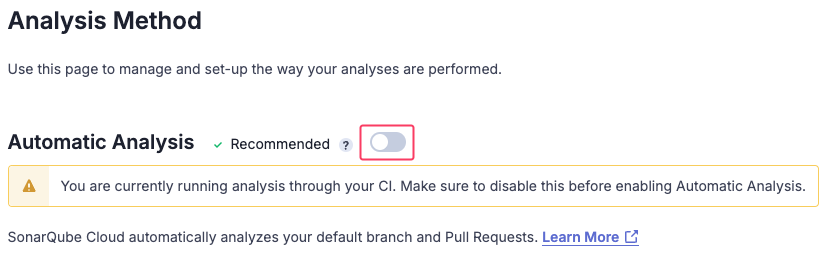
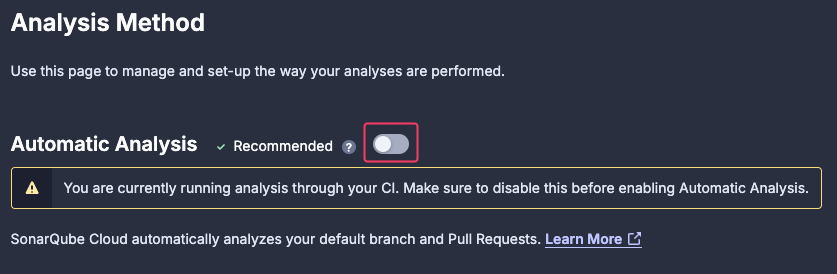
This will deactivate triggering analysis on merging pull requests.
In SAP Continuous Integration and Delivery Service, branch name must be specified in Additional Variables section of Compliance stage as PIPER_branchName variable:
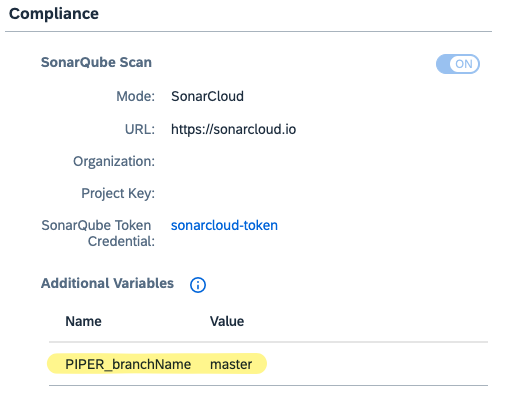
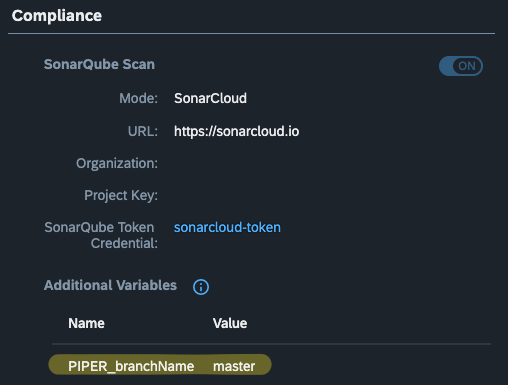
This will cause Piper to add -Dsonar.branch.name command-line parameter with the branch name (an excerpt from job logs):
[2025-02-12T09:24:28.841Z] info sonarExecuteScan - running command: sonar-scanner -Dsonar.organization=myorganization -Dsonar.projectVersion=1 -Dsonar.projectKey=myproject -Dsonar.branch.name=masterSourcd: SonarQube Branch Name.
How to set up SAP Cloud Transport Management service
SAP Cloud Transport Management service is used to transport artefacts (e.g. MTA archives, content or even entire sites in SAP Build Work Zone, standard edition) between different environments.
These transportation activities are:
- Uploading artefacts from source environment to specific transport node in Cloud Transport Management by making API calls Cloud Transport Management service instance endpoint. For instance, calls can be done from a build job in the Continuous Integration and Delivery service on the Release stage (e.g. for transporting MTA archives) or from the Site Manager (e.g. for transporting content of SAP Build Work Zone, standard edition).
- Deploying artefacts stored in transport queues of Cloud Transport Management service to target environment. This is achieved through API calls from the Cloud Transport Management service to endpoints of dedicated deployment service or content agent service instance running in the target environment.
The very first step is subscribe to the SAP Cloud Transport Management service. See Configuring Entitlements to SAP Cloud Transport Management.
Next, in order to enable uploading artefacts from source environment to specific transport node in Cloud Transport Management, programmatic access to the service must be enabled. To achieve it, an instance of the Cloud Transport Management service with the plan standard must be created in the subaccount where service is subscribed. See Creating a Service Instance and a Service Key.
TIP
Even though the subscription and the service instance can be created in any subaccount, it makes sense to do it in a dedicated "management" (or "infrastructure") subaccount, because:
- Deployment of artefacts in target environments requires destinations, pointing to deployment service or content agent services running in these environments, to be created in the subaccount where Cloud Transport Management service is subscribed. Keeping these "management" desinations isolated from other "business" destinations provides better overview and security of both "management" and "business" endpoints.
- Keeping "management" and "business" services isolated provides better transparency of audit, analytics and cost control for software development and delivery infrastructure.
Endpoints are configured either using service keys or as destinations in environments involved into transport management activities, depending on where they are called from.
For automated workflows, where no manual activities are required, the "...directly in an Application" approach must be used.
Before any object (transport nodes, transport routes, etc.) is created in Cloud Transport Management, it is required to create corresponding destinations in the subaccount where Cloud Transport Management service is subscribed. These destinations which will be used by Cloud Transport Management to bind transport nodes with the target environments.
Configuring environments for integration with Cloud Transport Management Service
For every subaccount, where with Cloud Management Service deploys artefacts (a so-called target subaccount), a dedicated destination must be created in the subassount where with Cloud Management Service is subscribed. These destinations point to the services responsible for deployment and running in the target subaccounts:
- In case of MTA artefacts, the SAP Cloud Deployment Service is used. The service is already present in the target subaccount. There is no need to install or configure it. See Creating Destinations Using SAP Cloud Deployment Service with OAuth2Password Authentication or Creating Destinations Using SAP Cloud Deployment Service with Basic Authentication.
- In case of content and sites from SAP Build Work Zone, the service responsible for deployment is an instance of SAP Build Work zone, standard edition service.
Settung up landscape in Cloud Transport Management
The landscape in Cloud Transport Management may resemble development and delivery landscape as described in Delivering Applications section of Best Practices for SAP BTP guide. The landscape may contain dedicated transport nodes for Development, Test, Pre-Production and Production environments. For every content type to be transported (either uploaded or deployed) by Cloud Transport Management a dedicated transport node must be created. For instance, production-mta for deploying MTA archives into Produciton subaccount and production-content for transporting SAP Build Work Zone, standard edtion content and sites into Production subaccount.
The idea is to let the artefacts be uploaded to development-* nodes and then be forwadred to test-* and then further to production-* nodes. Importing artefacts into any node (except of development-*) must cause the artefacts to be deployed into correspoinding environment. In order to prevent deployment when artefacts are imported, a node must be specified as virtual. For such nodes no destination can be specified, meaning no deployment would take place when artefacts are imported into the node. This is exactly what is needed for development-* nodes.
Setting up upload of MTA archives from Continuous Integration and Delivery service into Cloud Management Service
Uploading MTA archives is done directly from the Continuous Integration and Delivery service by using a service key for the Cloud Transport Management service stored as credentials. See See Creating a Service Instance and a Service Key and Integrate Cloud Transport Management into Your Job. No destinations in any subaccount are involved.
Setting up upload of content and sites from SAP Build Work Zone, standard edition into Cloud Management Service
There is no need to subscribe to SAP Cloud Transport Management service in the source environment. Only a destination having exact name ctms_destination must be created in the source environment as described in Integrate SAP Cloud Transport Management Service.
Resources
Product pages and other articles mentioned in this guide: